

Description
Organize Tasks Across Devices with Any.do
Any.do is a productivity-focused desktop application designed to help users manage personal and professional tasks efficiently. It serves as a comprehensive task manager and calendar tool, enabling seamless synchronization across multiple devices. The software allows users to create to-do lists, set time and location-based reminders, attach notes or files, and plan daily agendas using drag-and-drop functionality. Ideal for professionals, students, and busy individuals, Any.do supports real-time collaboration and task tracking in dynamic environments. It is particularly useful for those who need to stay organized across work and personal life. The application integrates with web and mobile platforms, ensuring continuity whether users are at a desk, on a commute, or in a meeting. Its core purpose is to reduce mental clutter by centralizing all responsibilities in one accessible place.
Key Features & Capabilities
- Multi-Device Sync – Tasks and updates are automatically synchronized across Windows, Mac, Android, iOS, and web platforms, ensuring consistent access to your to-do list regardless of device.
- Drag-and-Drop Planning – Users can rearrange tasks within their agenda by dragging them to different times or dates, enabling intuitive daily planning and prioritization.
- Smart Reminders – Set reminders based on time, location, or recurring intervals, helping users stay on track without manual follow-ups.
- Task Attachments – Add notes, sub-tasks, or files directly to tasks to provide context and ensure nothing is overlooked during execution.
- Advanced Search – Quickly locate specific tasks, notes, or sub-tasks using a built-in search function, improving efficiency when managing large workloads.
User Interface, Workflow & Performance
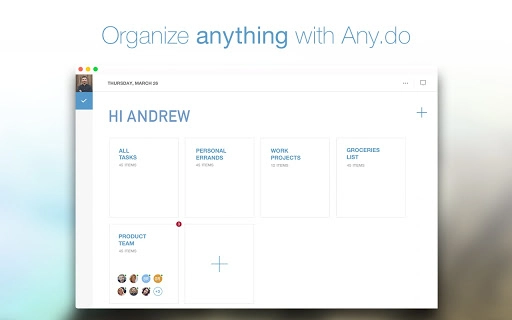
The user interface of Any.do is clean and minimalistic, emphasizing usability and visual clarity. Navigation is straightforward, with a sidebar for task categories, a central workspace for task lists, and a calendar view for time-based planning. The layout adapts well to both desktop and tablet-sized screens, maintaining consistency across platforms. Users can switch between list, agenda, and calendar views with minimal effort, allowing flexible task management based on preference. The workflow is designed to reduce friction: creating tasks, assigning reminders, and organizing them takes just a few clicks. Performance appears stable, with no reported lag during task updates or sync operations. The developer did not specify resource usage details, but general behavior suggests efficient CPU and RAM handling. Stability is maintained across sessions, with no known crashes or freezes reported in public forums. Overall, the application delivers a smooth experience for daily use.Compatibility & System Requirements
Any.do is available for Windows and Mac operating systems, supporting both desktop platforms with a consistent feature set. The software version released on March 13, 2024, has an installation size of 120 MB. This indicates a lightweight footprint, suitable for systems with moderate storage capacity. Exact system requirements were not listed, so users should ensure their devices meet standard desktop application needs. Platform compatibility information is limited to the two major desktop operating systems. No additional hardware specifications were provided. Users are advised to check official channels for updates or compatibility alerts. The software is designed to run on modern systems with standard configurations.Pros and Cons
Pros
- Seamless synchronization across multiple devices and platforms
- Intuitive drag-and-drop interface for task planning
- Powerful reminder system with time, location, and recurrence options
- Supports attachments for notes, files, and sub-tasks
- Fast and accurate search across tasks and notes
- Free to use with full access to core features
Cons
- Advanced features may require a paid subscription (not specified)
- Resource usage details not publicly available
- Limited system requirement documentation
- Offline functionality not confirmed
- Integration with third-party tools not detailed
FAQ Section
Is Any.do compatible with Windows and Mac?
Yes, Any.do is available for both Windows and Mac operating systems, ensuring broad desktop accessibility.
Is the software free to download and use?
Yes, Any.do is free to download and use. Core features are accessible without cost.
Can I use Any.do offline?
Offline usage capabilities were not specified. Synchronization requires an internet connection for full functionality.
How often are updates released?
The latest version was released on March 13, 2024. Regular updates are likely, though frequency is not publicly disclosed.
Is Any.do secure and private?
While specific security measures were not detailed, the application is designed for personal and work task management, suggesting data protection practices are in place.
Final Thoughts + CTA
Any.do stands out as a reliable, user-friendly desktop tool for managing tasks and schedules across multiple devices. Its strength lies in seamless synchronization, smart reminders, and a clean interface that supports both personal and professional workflows. The drag-and-drop planning and advanced search features enhance productivity without overwhelming users. While some advanced capabilities may require a subscription, the free version offers robust functionality. It is best suited for individuals seeking a centralized, cross-platform task manager. For those looking to stay organized with minimal friction, Any.do delivers a polished experience. Download Any.do now.Guides & Tutorials for Any.do App for Chrome
How to install Any.do App for Chrome
- Click the Preview / Download button above.
- Once redirected, accept the terms and click Install.
- Wait for the Any.do App for Chrome download to finish on your device.
How to use Any.do App for Chrome
This software is primarily used for its core features described above. Open the app after installation to explore its capabilities.
User Reviews for Any.do App for Chrome 0
No reviews found





